EasyDNN News 15 - Meet the New EasyDNN News Article Editor
Discover a completely redesigned publishing experience that combines intuitive editing, powerful multimedia tools, artificial intelligence, advanced SEO features, and much more – all in one place.
About a year ago, we introduced the first version of the completely redesigned Article Editor in EasyDNN News. It was an excellent solution right from the start, and the response from our users was overwhelmingly positive.
But that was only the beginning.
Over the past year, we've continued refining the editor, improving the user experience, and introducing powerful new features. Our goal was simple: to create the kind of publishing experience we've always wanted our customers to have.
Today, with EasyDNN News 15, we've achieved that vision. The new Article Editor has evolved into a mature, feature-rich, and exceptionally powerful publishing tool.
If you haven't switched to the new Article Editor yet, now is definitely the time. It takes both the user experience and publishing capabilities to an entirely new level.
As someone who regularly publishes a large number of articles across different websites, I can confidently say that I've yet to come across another CMS or publishing platform that offers the same combination of intuitive editing and powerful functionality. And I don't think that's an exaggeration.
EasyDNN News is much more than just a news or blogging module. It's a comprehensive publishing platform capable of handling everything from simple announcements and personal blogs to sophisticated, content-rich news websites.
Let's take a closer look at the new EasyDNN News Article Editor and discover what makes it so exceptional.
Creating great content should be easy. Whether you're publishing a simple news article, a detailed blog post, a photo gallery, an event announcement, or a complex article with multimedia content, your publishing tools should help you work faster, not make things more complicated.
That's exactly what the new EasyDNN News Article Editor is designed to do.
Completely rebuilt from the ground up, the new Article Editor brings a modern, intuitive, and powerful content creation experience to DNN websites. It combines the extensive capabilities of EasyDNN News with an interface that makes even advanced publishing tasks remarkably simple.
From managing images and galleries to embedding social media posts, generating content with AI, optimizing articles for search engines, and managing event registrations, everything is conveniently accessible from a single editing environment.
Let's take a closer look at what makes the new EasyDNN News Article Editor such a powerful tool for modern content publishing.
A Modern Editing Experience That Makes Publishing Easier
The first thing you'll notice about the new Article Editor is its completely redesigned interface.
Built with React, an API-first architecture, and customized Material UI components, it delivers a fast, responsive, and intuitive editing experience without the interruptions of traditional page postbacks.
Every aspect of the interface is designed to simplify everyday work.
Creating a new article is straightforward. Start with a title, select a category, and add your content. Additional fields and advanced settings are conveniently organized and available whenever you need them.
The interface remains easy to navigate even when working with complex articles containing numerous images, galleries, documents, and other elements.
Save buttons remain visible while editing, so there's no need to scroll through long forms just to save your changes.
And because different users have different needs, administrators can customize which fields are visible to specific user roles. This makes it possible to provide a simple, distraction-free interface for content authors while keeping advanced functionality available to experienced editors and administrators.
The result is a publishing environment that's powerful enough for professionals and intuitive enough for beginners.
Write, Format, and Design Rich Content with Ease
At the heart of the Article Editor is a powerful HTML editing experience designed for creating professional-looking content.
Authors have access to extensive formatting options, including text styles, fonts, sizes, colors, templates, and other tools needed to create visually appealing articles.
Content can be prepared directly in the editor or pasted from applications such as Microsoft Word, with improved handling of unwanted formatting.
The editor also supports CSS classes, making it easier to work with predefined website styles and maintain consistent formatting.
But modern content is about much more than text.
The Article Editor provides convenient tools for inserting images, videos, audio files, documents, galleries, links, and social media posts directly into the article body.
Simply place the cursor where you want an element to appear, select the appropriate tool, and insert your content.
No HTML knowledge is required.
Powerful Media Manager – Everything You Need for Images, Videos, and Audio
Images and multimedia content play a major role in making articles engaging and attractive.
The integrated Media Manager makes working with these elements exceptionally convenient.
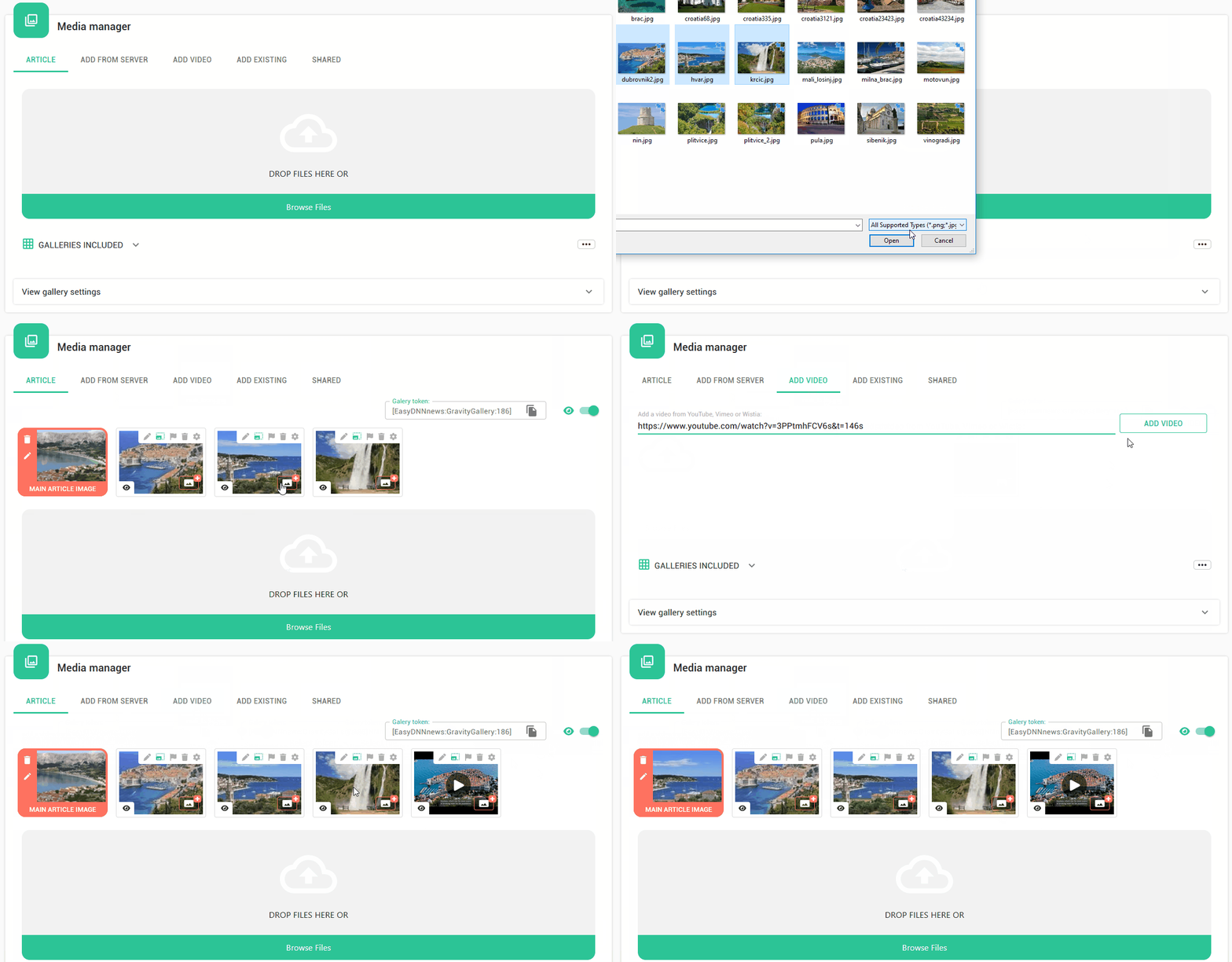
Authors can upload images from their computers, select existing files from the server, and organize media associated with an article.
Images can be rearranged using drag and drop, and each image can have its own title and description.
You can also assign an image as the article's introductory image or main image with a single click.
Insert media anywhere in your article
Want to place an image between two paragraphs? Or include a video in the middle of a product presentation?
Simply position the cursor in the HTML editor, click the media insertion button, and choose the desired file.
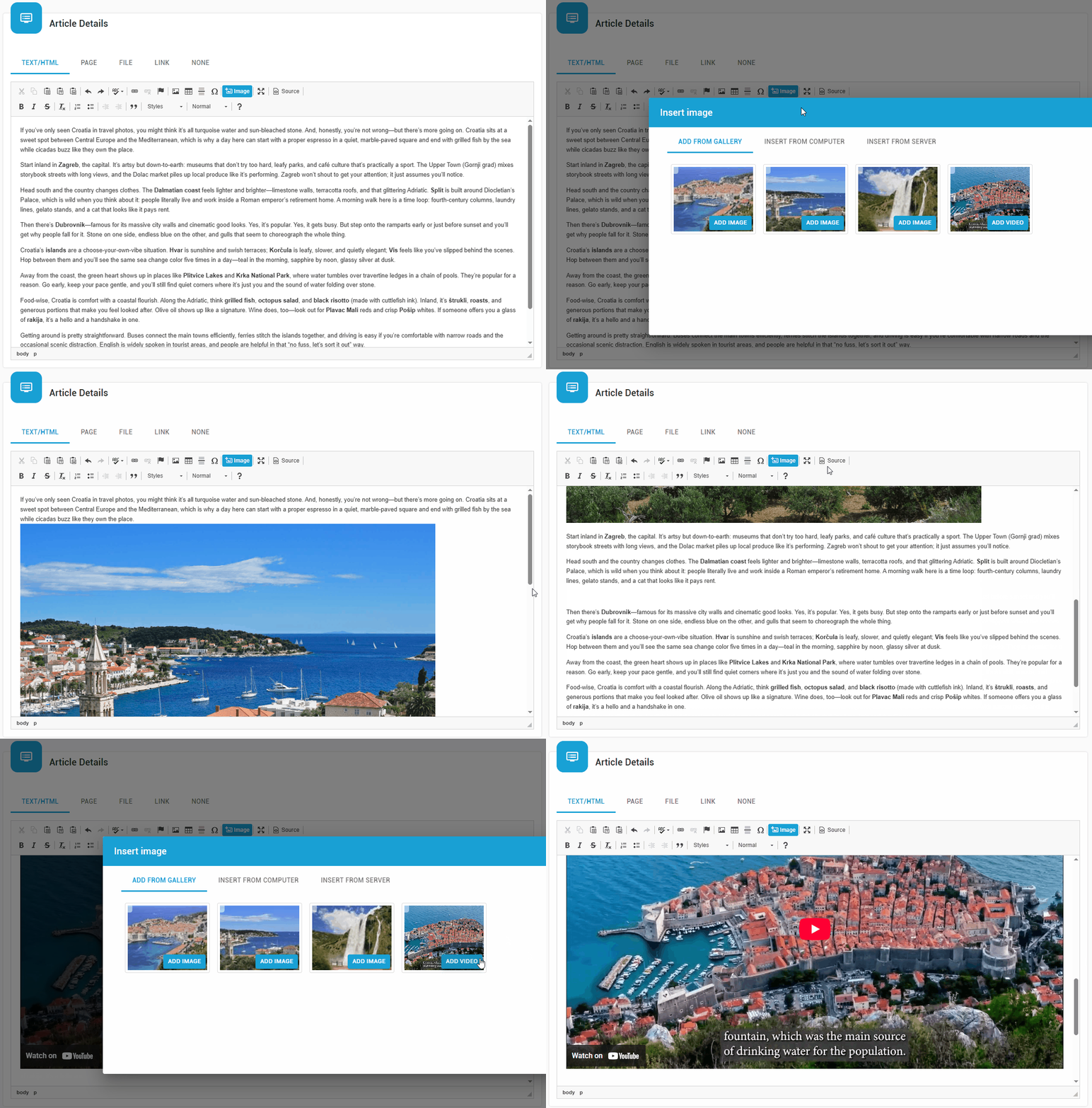
You can select media already associated with the article, upload a new file, or browse existing server files with convenient thumbnail previews.
The editor supports images, videos, and audio files, including MP3 and M4A formats.
Individual media elements and complete image galleries can also be inserted using tokens, giving authors additional flexibility over their placement within article content.
Quick Edit – Manage multiple images in one place
Managing image metadata becomes particularly important when working with articles containing many photographs.
The Media Manager includes a convenient Quick Edit feature that allows authors to edit the titles, descriptions, and file names of multiple media files from a single interface.
Instead of opening each image individually, you can efficiently manage the information associated with an entire collection of images.
For multilingual websites, Quick Edit also supports AI-powered translation of media metadata, helping authors maintain properly localized image titles and descriptions across different languages.
This is a valuable time-saving feature for publishers who regularly work with large numbers of images.
Advanced Image Galleries with EasyDNN Gallery Integration
Sometimes, a single image simply isn't enough.
Travel stories, product presentations, real estate listings, event reports, and many other types of content benefit from rich, interactive image galleries.
The Article Editor supports image galleries directly, while integration with the EasyDNN Gallery module provides an even wider range of powerful possibilities.
Authors can create and manage sophisticated galleries using different display types, including:
- Chameleon Gallery – an attractive slideshow-style presentation.
- Gravity Gallery – a gallery with thumbnail navigation.
- Zero Gravity Gallery – flexible gallery presentations, including JustifiedGallery and Swiper.
These options provide different ways to showcase photographs, making it easy to choose the presentation that best suits your content.
Gallery settings offer control over image dimensions, presentation styles, lightbox behavior, titles, descriptions, and other display options.
Place galleries exactly where you want them
One of the most useful capabilities is the freedom to insert complete galleries anywhere within the article body.
Using gallery tokens, authors can position galleries between paragraphs or alongside other content, rather than being limited to displaying them only at the beginning or end of an article.
Gallery tokens can also be used within article HTML templates, providing additional control over gallery placement.
Reuse existing images and galleries
There's no need to upload the same images repeatedly.
The Shared Gallery provides convenient access to frequently used media, while existing article galleries can be reused in other articles.
Authors can insert multiple galleries into a single article, select individual images from existing galleries, and use those images as main article images.
This makes the Article Editor particularly suitable for websites with extensive visual content.
Advanced gallery capabilities require the EasyDNN Gallery module and enabled integration.
Documents and Downloads – Simple and Organized
Many articles need more than text and images.
PDF brochures, technical documentation, reports, forms, product specifications, and other downloadable files are often an essential part of website content.
The Article Editor includes a dedicated document management interface that makes uploading and organizing files easy.
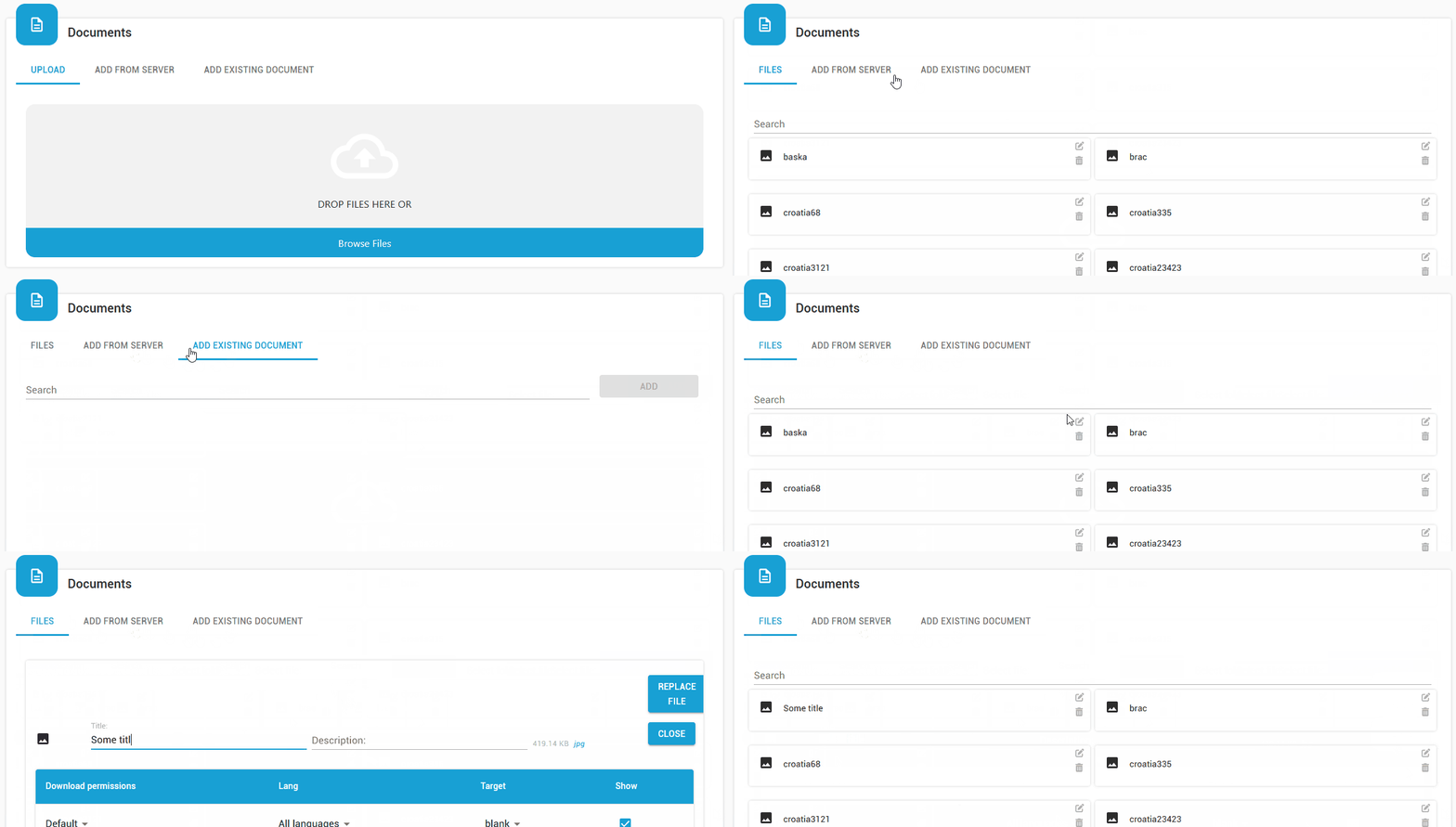
Documents can be uploaded using drag and drop, selected from a computer, or added from existing files on the server.
Each document can have its own title and description, while additional information and download statistics are conveniently available.
Authors can insert document links directly into article content or make documents available as attachments.
And when a document needs updating, the Replace Document option simplifies the process by allowing an existing document to be replaced without manually removing and recreating its attachment.
These features make EasyDNN News an excellent choice for websites that regularly publish downloadable resources.
Link Manager – Connect Your Content Effortlessly
Links help readers discover related content, access additional information, and navigate between different parts of a website.
The Article Editor includes a convenient Link Manager integrated directly into the HTML editing toolbar.
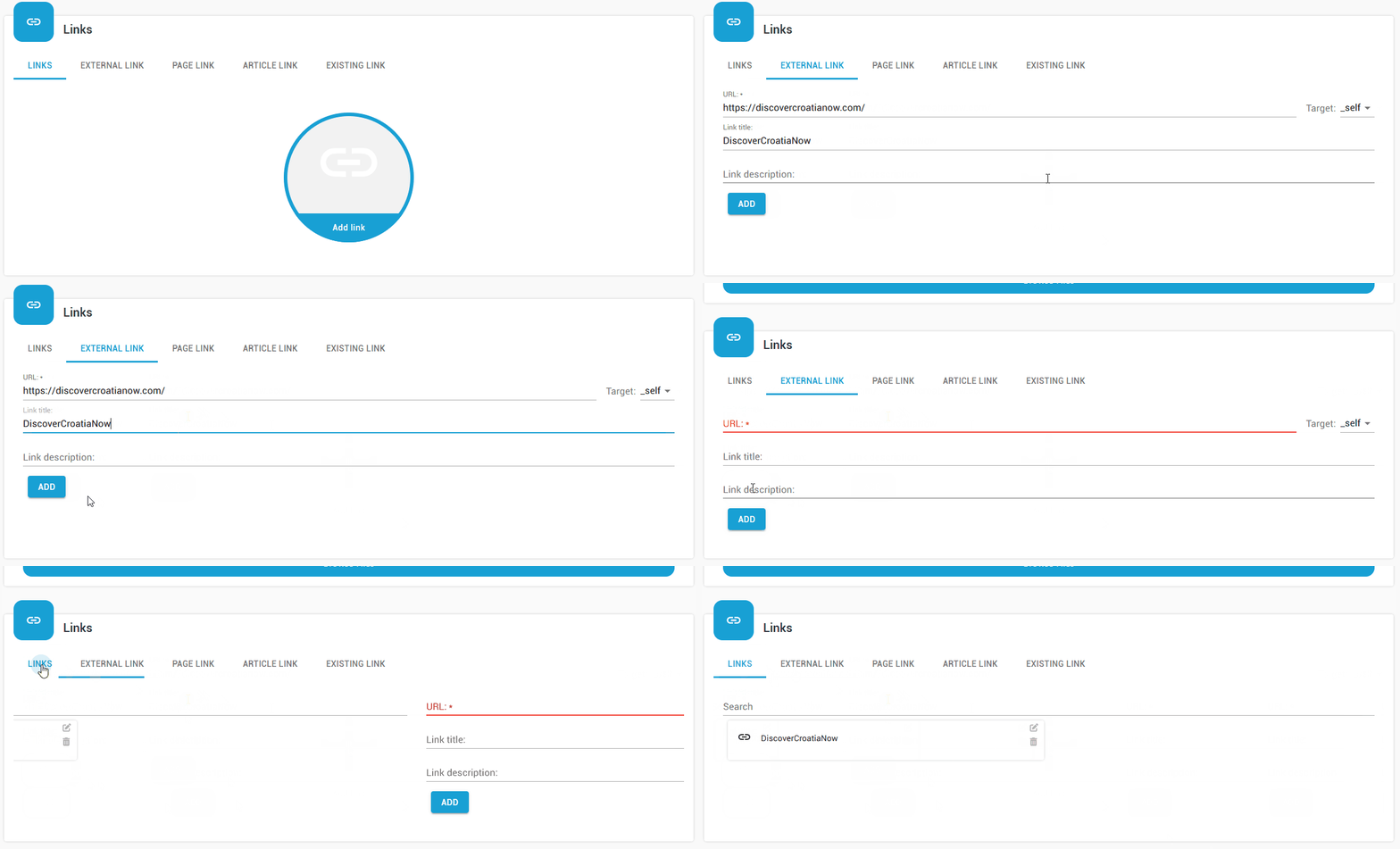
To create a link, simply select the desired text and open the Link Manager.
You can link to external websites, internal DNN pages, existing EasyDNN News articles, and files or documents.
The interface also allows authors to upload files when creating links.
For more advanced use, links can have their own titles, descriptions, and display settings, and collections of related links can be positioned within article content using tokens.
Whether you're connecting readers to another article, referencing an external resource, or sharing a downloadable document, everything can be done without manually editing HTML.
Embed Social Media Posts with Just a URL
Social media content has become an integral part of modern publishing.
Articles frequently include videos, announcements, public statements, social media reactions, and other content originally published on social platforms.
The new Article Editor makes embedding this content remarkably simple.
Instead of searching for platform-specific embed codes, authors can embed social media posts by simply pasting their URLs.
Supported platforms include:
- Facebook
- Instagram
- YouTube
- Vimeo
- X (formerly Twitter)
- TikTok
- LinkedIn
- Pinterest
Just position the cursor in the HTML editor, click the Social Post button, paste the URL, and choose Embed.
That's all it takes.
This makes it easy to enrich articles with content from social networks, create stories around social media activity, or incorporate videos and announcements into website content.
And because the process requires no technical knowledge, it can be used comfortably by any content author.
Artificial Intelligence – A Powerful Assistant for Content Creators
Artificial intelligence can significantly reduce the time needed to prepare, optimize, and translate content.
The EasyDNN News Article Editor brings AI-powered assistance directly into the publishing workflow.
AI-assisted content creation and translation
Authors can take advantage of AI functionality to help generate article content and translate articles into other languages.
This is particularly useful for websites that publish frequently or manage content in multiple languages.
Instead of handling every aspect of content creation and translation manually, editors can use AI assistance while retaining control over the final published result.
AI SEO Manager – Better SEO with Less Effort
Search engine optimization is essential for attracting visitors, but writing effective SEO titles and descriptions isn't always easy.
The integrated AI SEO Manager makes this task considerably simpler.
It analyzes article content and generates five suggestions for the HTML Title tag and five suggestions for the Meta description.
Authors can review the suggestions, choose the most suitable options, and modify them as needed.
A convenient Google Search preview provides an indication of how the article may appear in search results.
The AI SEO Manager also supports translated articles, helping authors optimize content for multilingual websites.
AI image generation
Need an illustration for your article but don't have a suitable image available?
Through integration with EasyDNN Gallery, the Article Editor also provides access to AI-powered image generation.
Authors can generate original images directly within their publishing workflow, making it easier to prepare attractive visual content without switching between multiple applications.
AI translation of image metadata
Multilingual publishing involves more than translating article text.
Image titles and descriptions also need to be localized.
The Media Manager's Quick Edit interface allows AI-powered translation of metadata for selected images, reducing repetitive work and helping maintain consistent content across languages.
AI features require appropriate configuration, including an OpenAI API key. AI image generation requires the EasyDNN Gallery module.
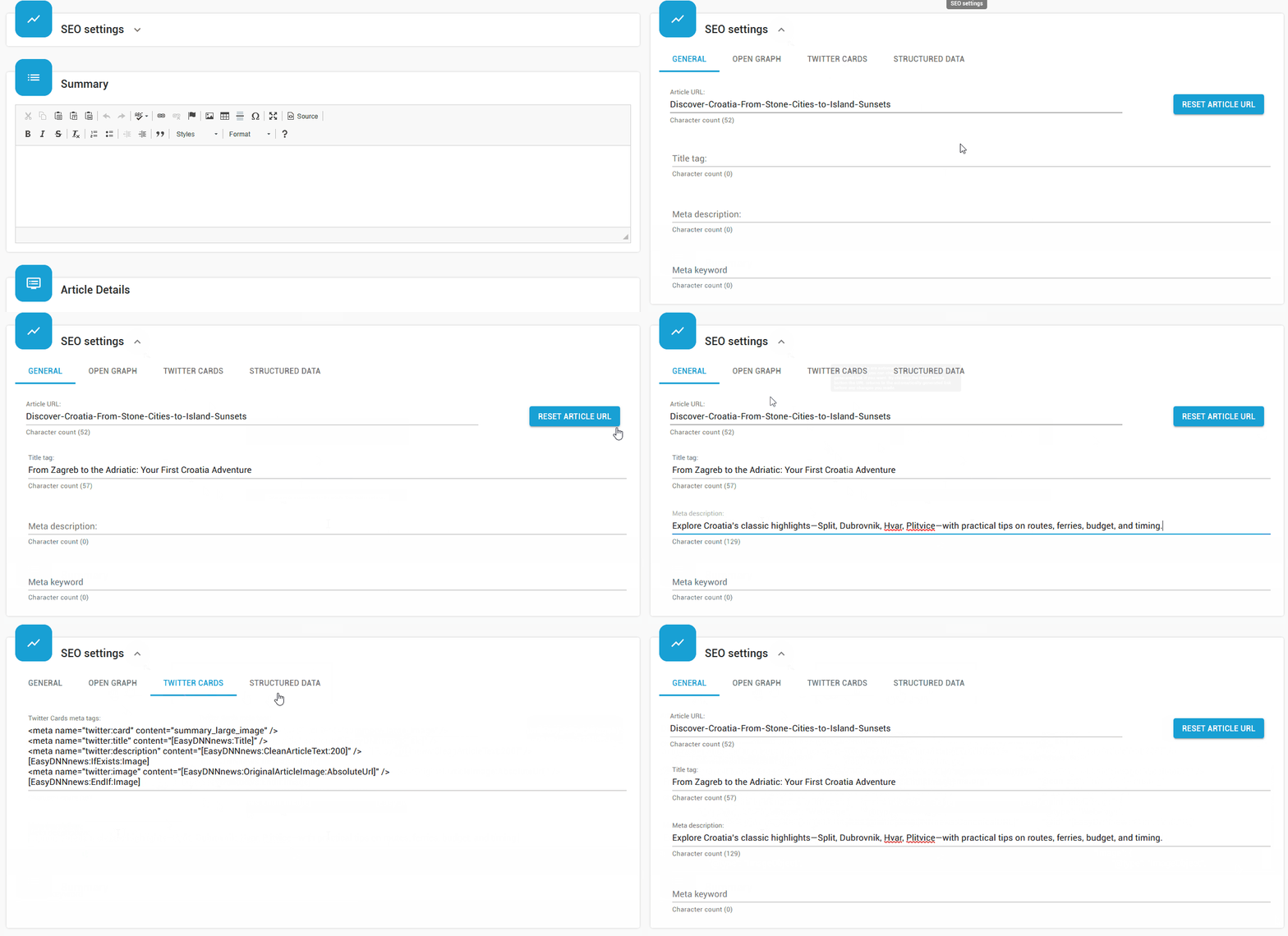
Complete SEO Control for Every Article
Creating high-quality content is only part of successful publishing. Making that content discoverable is equally important.
The Article Editor provides a dedicated SEO settings section that brings important optimization options together in one place.
Authors can configure:
- Custom article URLs.
- HTML Title tags.
- Meta descriptions and keywords.
- Open Graph metadata.
- Twitter Card settings.
- Structured Data using schema.org.
These capabilities allow editors to control how articles are represented to search engines and how their metadata is used when content is shared on social networks.
The integrated Google Search preview makes it easier to review titles and descriptions before publishing.
Combined with the AI SEO Manager, these features provide a comprehensive SEO editing experience that is accessible even to users without specialized SEO knowledge.
Create and Manage Events with Registrations
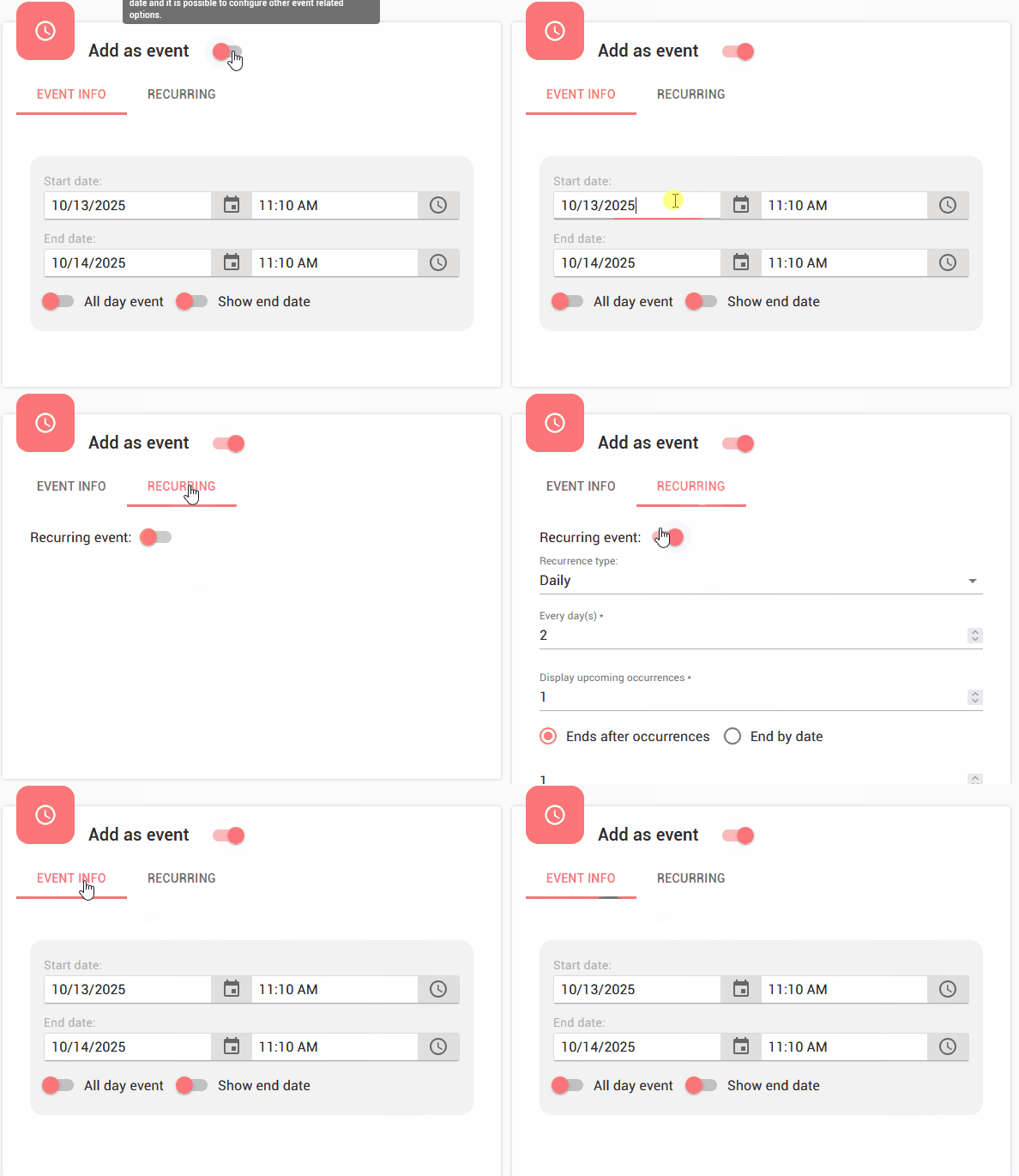
The Article Editor isn't limited to traditional news and blog articles.
EasyDNN News also provides extensive event management functionality, allowing authors to create and manage events directly from the same modern editing interface.
Events can include dates, times, locations, and recurring schedules.
Authors can manage individual occurrences of recurring events, making it easier to handle changes to specific dates without unnecessarily modifying the entire event series.
Event registration management
The editor also supports event registration settings.
Depending on the event configuration, authors can manage registration availability, available places, and options for registered users and guests.
EasyDNN News provides additional event-related functionality, including supported reservation payment options, invitations, and notifications.
These capabilities make the module useful for publishing workshops, conferences, seminars, training courses, and other events where visitor registration is required.
Location management with Google Maps
The integrated Google Maps interface makes it easy to associate locations with articles and events.
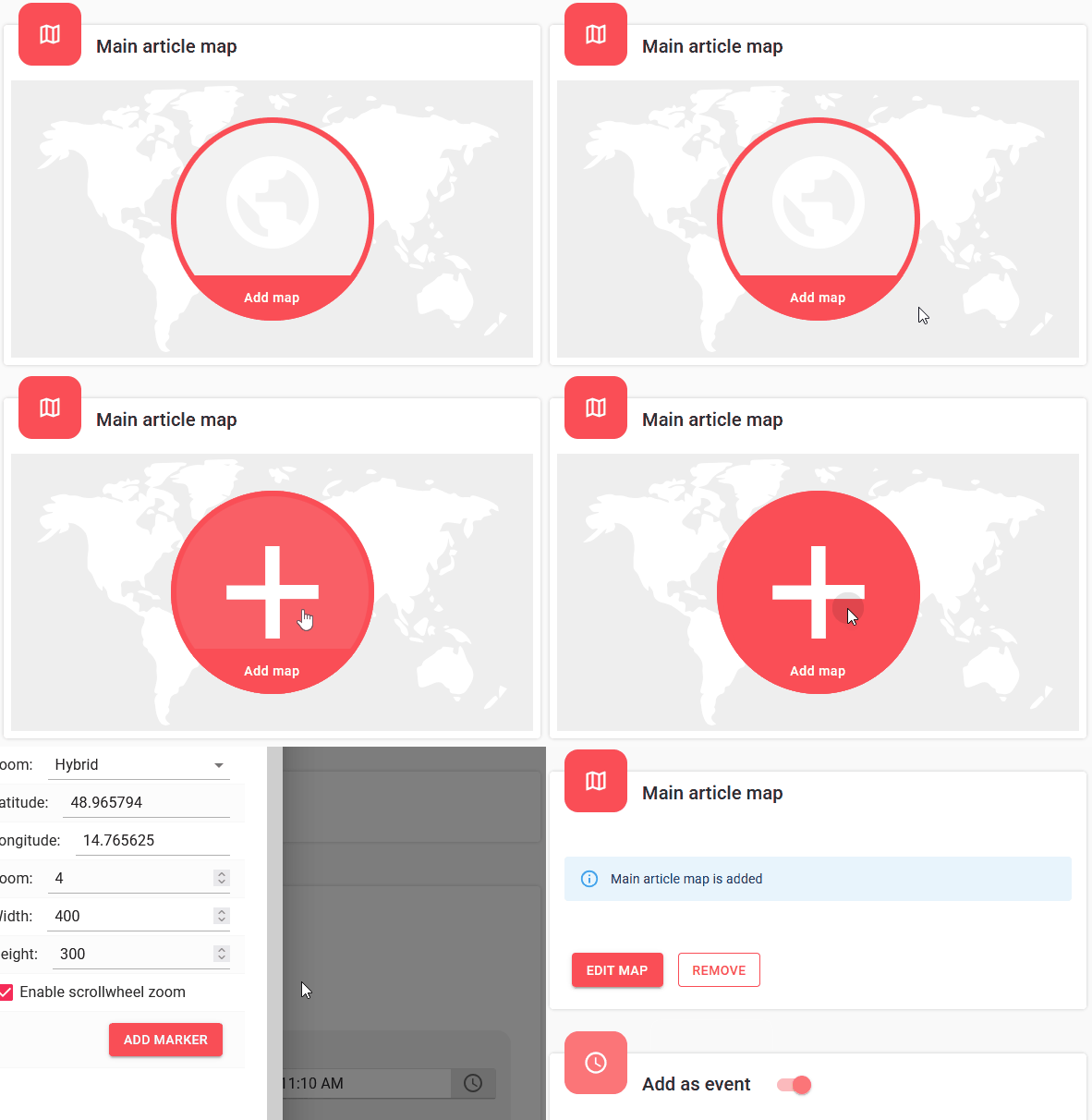
This is useful not only for event venues but also for business locations, attractions, points of interest, and location-based content.
With event management and article publishing combined in a single module, website administrators can manage a wide range of content without relying on separate publishing systems.
Custom Fields – Create Much More Than News Articles
Not all content fits into the traditional structure of a news article.
Sometimes you need additional information such as prices, dimensions, addresses, specifications, dates, or other structured data.
EasyDNN News provides powerful Custom Fields functionality, fully integrated into the new Article Editor.
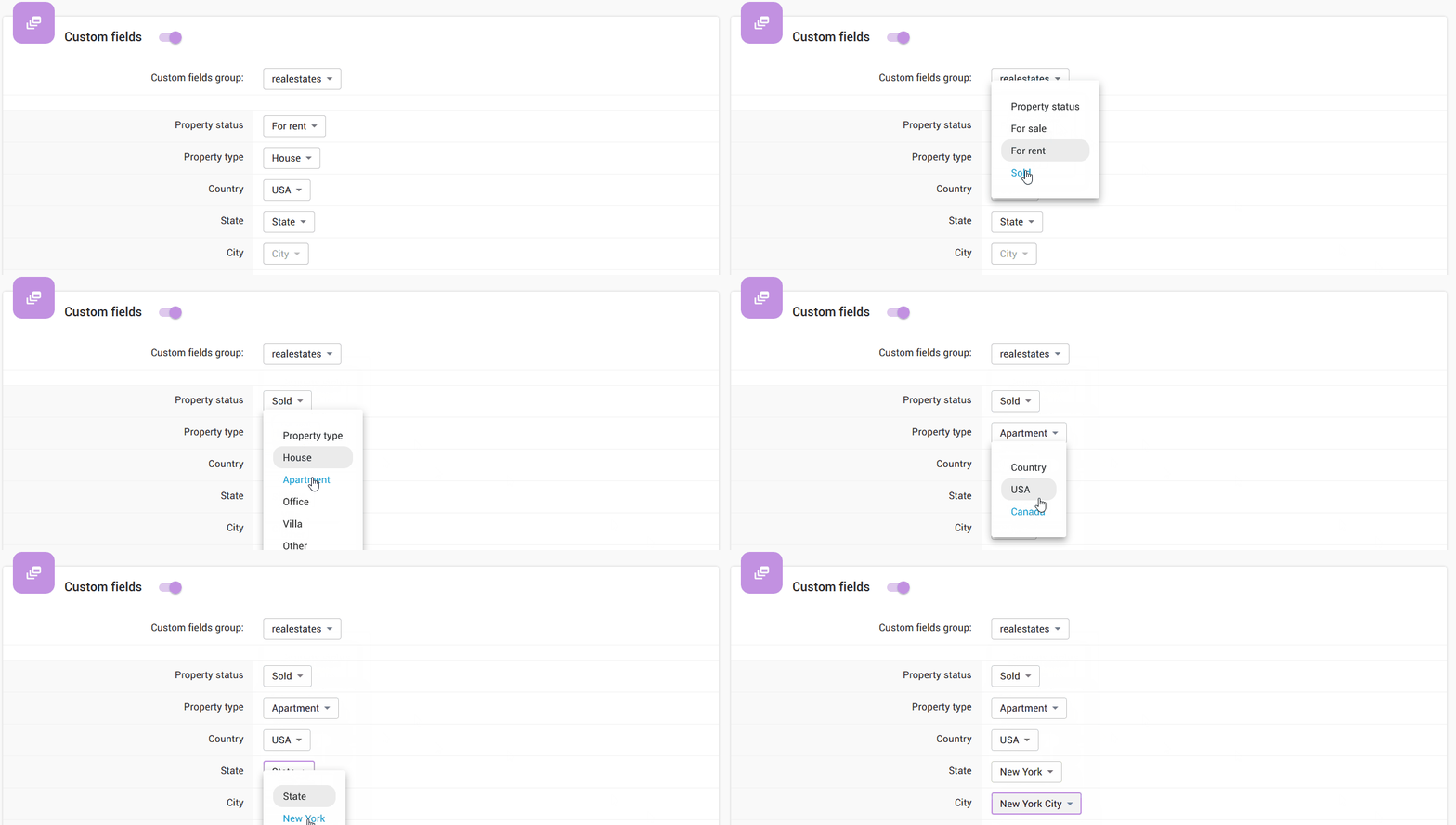
Administrators can define additional fields that authors fill in when creating or editing content.
This enables EasyDNN News to support many different applications beyond traditional publishing.
Examples include:
- Real estate listings with property characteristics.
- Recipe websites with ingredients and preparation details.
- Job listings with employment information.
- Product catalogs with technical specifications.
- Classified advertisements.
- Business directories and other specialized content.
Combined with filtering, search, and customizable display templates, Custom Fields make EasyDNN News a flexible content management solution for a broad range of websites.
Multilingual Publishing Made More Convenient
Managing a multilingual website can require considerable additional work, especially when articles contain images, SEO information, and other metadata that also need translating.
The Article Editor provides AI-assisted article translation, helping content teams manage articles in different languages.
The AI SEO Manager can assist with titles and descriptions for translated articles, while Quick Edit supports AI-powered translation of image metadata.
Together, these capabilities reduce the amount of repetitive work involved in publishing multilingual content.
Authors can focus on preparing and reviewing high-quality localized articles rather than manually repeating every editing task for each language.
Article History, Permissions, and Editorial Control
A great publishing tool needs to support not only content creation but also content management.
The Article Editor includes an Article History and Restore Article interface, allowing authorized users to review article history and restore previous versions when necessary.
This provides an additional level of control when editing existing content.
Access to article history can be managed through permissions, ensuring that sensitive editorial operations are available only to appropriate users.
Administrators can also customize which fields are visible to different user roles.
For example, occasional content authors may only need basic editing options, while experienced editors require access to SEO settings, advanced article properties, or other specialized functionality.
Default presets provide further flexibility by allowing administrators to configure common behaviors, such as predefined token values and automatic main image assignment.
This combination of features makes EasyDNN News suitable for both small websites managed by a single author and larger websites with multiple contributors and more complex editorial workflows.
One Powerful Editor for All Your Content
What makes the new EasyDNN News Article Editor special isn't just the number of features it offers.
It's how those features work together.
You can create an article, format its content, upload images, build galleries, insert videos, attach documents, embed social media posts, manage links, optimize SEO settings, use AI assistance, and publish everything from one convenient interface.
There's no need to constantly switch between separate tools or rely on technical knowledge to perform everyday publishing tasks.
At the same time, advanced users have access to extensive functionality for creating sophisticated content and managing specialized websites.
Whether you're running a company website, a news portal, a blog, a travel website, an event platform, or a content-rich business application, the Article Editor provides the tools you need.
Powerful features. Intuitive workflows. Less repetitive work. More time for creating great content.
That's what the new EasyDNN News Article Editor is all about.
Experience a Better Way to Publish with EasyDNN News
If you're already using EasyDNN News, explore the new Article Editor and discover how much easier your everyday publishing tasks can become.
And if you're looking for a powerful and flexible content publishing solution for DNN, EasyDNN News brings together modern technology, extensive functionality, and an intuitive user experience in one complete package.
Discover EasyDNN News and take your content publishing to the next level.

Contact author