EasyDNN Cookie Consent 3.0: AI-Assisted Cookie Consent Setup, New Themes and Site-Wide Deployment for DNN Websites
EasyDNN Cookie Consent 3.0 is a major new release that makes cookie consent setup easier, smarter and more practical for real DNN websites.
Modern websites rarely use only a few simple cookies. They often include analytics tools, marketing pixels, advertising scripts, embedded videos, maps, third-party widgets, Google services and multiple DNN modules that can create cookies or load external resources. Managing all of that manually can quickly become complicated.
Version 3.0 helps solve this by adding AI-assisted setup, AI-powered scanner recommendations, AI diagnostics explanations, new frontend themes and a new ASCX Skin Object for easier site-wide deployment. To enable AI assistance in the module, you need to add an OpenAI API key.
In short: EasyDNN Cookie Consent is now more than a cookie banner. It is a complete privacy consent and script control solution for DNN websites.
AI Assistant: Make Cookie Consent Setup Easier
One of the biggest improvements in EasyDNN Cookie Consent 3.0 is the new AI Assistant.
Cookie consent setup often requires many decisions:
- Which cookies are necessary?
- Which cookies are analytics or marketing?
- Should Google Consent Mode be enabled?
- Should embedded content be blocked before consent?
- Which cookies should be documented in the Cookie Catalog?
- Which cookies need cleanup rules?
- What should be reviewed before going live?
The AI Assistant helps administrators work through these questions more easily.
It does not replace legal review, and it does not promise automatic compliance. Instead, it acts as a practical setup helper that reviews technical context, explains findings and suggests configuration improvements that the administrator can review before applying.
This is especially useful for DNN site owners who want a better consent setup but do not want to manually research every cookie, script or tracking resource on their website.
AI Setup Wizard: Guided Configuration for Your Website
The new AI Setup Wizard helps administrators configure EasyDNN Cookie Consent step by step.
Instead of starting with a long settings screen and trying to decide everything manually, the wizard asks practical questions about the website:
- Who is the audience?
- Are EU or US visitors expected?
- Are analytics or advertising tools used?
- Is Google Consent Mode needed?
- Are there embedded videos, maps or third-party content?
- Should optional scripts be blocked before consent?
Based on those answers and the current module configuration, the AI Setup Wizard can prepare a structured set of recommendations.
For the site owner, this means a faster and more confident setup process. The wizard can help with settings such as privacy mode, Google Consent Mode behavior, automatic embed blocking, consent logging, available categories, Cookie Catalog items and Cookie Rules.
The administrator always stays in control. The AI can suggest changes, but supported changes must be selected and confirmed before they are applied.
.png)
AI Scanner Recommendations: Understand Detected Cookies and Trackers Faster
EasyDNN Cookie Consent already includes a Cookie Scanner that helps detect cookies and tracking resources on the current page. Version 3.0 makes that workflow more useful with AI Scanner Recommendations.
After scanning a page, administrators can ask AI to review the findings and provide guidance.
The AI can help explain what detected cookies or tracking resources may be used for, suggest possible categories, recommend Cookie Catalog entries, suggest Cookie Rules and point out scripts or embeds that may need attention.
Instead of seeing only a list of cookies and resources, the administrator receives a more useful explanation of what should be reviewed and which actions may make sense.
This can save a significant amount of time, especially on websites that use Google services, marketing pixels, embedded videos, maps, widgets or multiple third-party tools.
Nothing is changed automatically. Existing Cookie Catalog entries and Cookie Rules are not overwritten or deleted. The administrator reviews suggested additions and decides what to apply.
AI Diagnostics Explanation: Clearer Answers When Something Needs Attention
Consent setup can fail in subtle ways. A script may load too early. A video embed may appear before embedded content consent. A Google tag may need different Consent Mode behavior. A Do Not Sell link may be missing in a US privacy workflow.
EasyDNN Cookie Consent includes Consent Diagnostics to help detect these kinds of setup issues. In version 3.0, AI can now help explain individual diagnostic findings.
The AI Diagnostics Explanation feature can provide:
- Likely causes
- Recommended checks
- Suggested fixes
- Verification steps
- Important cautions
This helps administrators and developers understand what a warning means and what they should check next.
Instead of leaving users with only a technical diagnostic message, the module can translate the finding into clear and practical next steps.
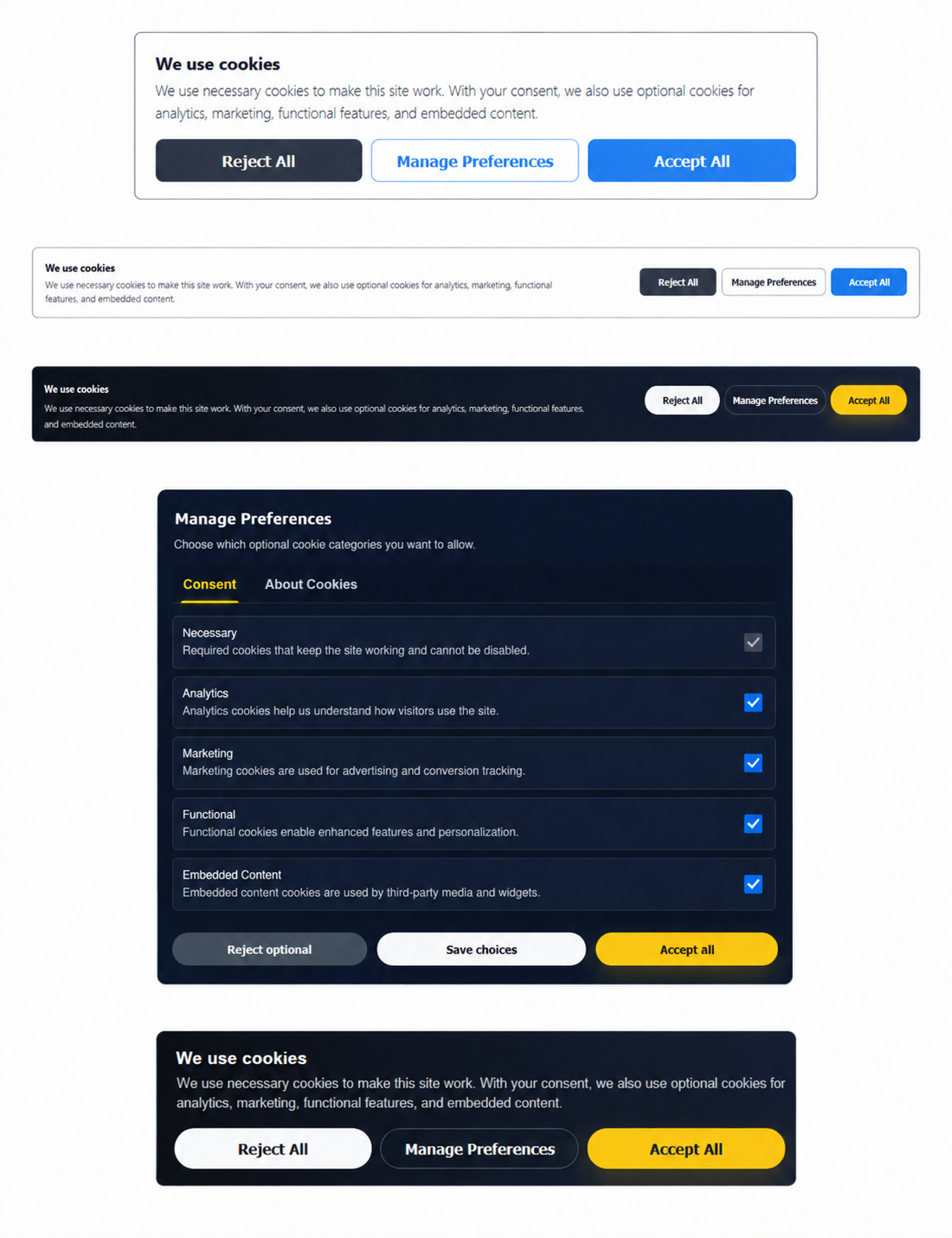
New Frontend Themes: Match the Consent Experience to Your Website
Cookie consent is part of the visitor experience. It should not feel like an unrelated technical popup.
EasyDNN Cookie Consent 3.0 introduces selectable frontend themes for the public banner, preferences modal and reopen button.
The included theme options make it easier to match the consent interface to different website designs:
- Default
- Modern Light
- Modern Light Compact
- Modern Dark
- Modern Dark Compact
This gives site owners more control over the appearance of the consent banner without requiring custom design work for every project.
For agency and multi-site workflows, this is a practical improvement. A corporate site may prefer a clean light design, a dark-themed website can use a matching dark modal, and compact layouts can be used when a smaller consent interface is preferred.
The result is a better visitor experience and a more professional appearance.
ASCX Skin Object: Easier Site-Wide Deployment
Cookie consent needs to work across the entire website, not just on one page.
Version 3.0 adds a new ASCX Skin Object that allows the public consent interface to be included directly in a DNN skin. This makes site-wide deployment easier for websites that use custom DNN skins and want the consent banner and related behavior to be available globally.
For visitors, this means a more reliable consent experience across the site.
For administrators and developers, it means the consent interface can be placed once in the skin and use the portal-wide saved configuration.
A normal module instance can still be used as the administration surface for settings, Cookie Scanner, Consent Diagnostics, AI Setup Wizard, Cookie Catalog, Cookie Rules, Managed Scripts, Import/Export and Consent Logs.
The benefit is simple: configure the module in one place, then render the public consent experience site-wide.
Google Consent Mode, GA4, GTM and AdSense Support
EasyDNN Cookie Consent continues to support modern Google consent workflows.
The module includes Google Consent Mode v2 support and can work with GA4, Google Tag Manager and Google AdSense.
Site owners can choose how Google tags should behave depending on their setup. Basic mode keeps Google tags blocked until the matching consent is granted. Advanced mode can be used when the site owner wants Google tags to load after a denied default consent state is registered.
For visitors, this means their choices can be reflected in Google consent signals.
For administrators, this means Google services can be managed from the same consent workflow instead of being handled separately.
EU, US and Strict Global Privacy Workflows
EasyDNN Cookie Consent supports different privacy workflows for different website needs.
EU / GDPR & ePrivacy mode
For websites that need a prior opt-in approach for optional cookies and scripts.
US Privacy / Opt-Out mode
For websites that need privacy choices such as Do Not Sell or Share and Targeted Advertising Opt-Out.
Strict Global mode
For websites that want to apply stricter prior blocking to all visitors without relying on GeoIP targeting.
The module also supports Global Privacy Control signals in US Privacy and Strict Global modes, helping websites respect browser-level privacy opt-out preferences where applicable.
This gives DNN website owners more flexibility than a one-size-fits-all cookie banner.
A Complete Cookie Consent Solution for DNN
EasyDNN Cookie Consent 3.0 helps DNN website owners move beyond a basic cookie banner.
It helps you give visitors clear privacy choices, block optional scripts before consent, support Google Consent Mode v2, handle EU and US privacy workflows, respect Global Privacy Control, document cookies, scan tracking resources, diagnose setup issues and use AI-assisted recommendations to simplify configuration.
It is a practical, powerful and user-friendly solution for managing cookie consent and privacy choices on DNN websites.
EasyDNN Cookie Consent 3.0 is now available.
How to get EasyDNN Cookie Consent?
Cokie Consent can now be purchased on the DNN Store as a standalone module. You can also download a trial version from our website. BlockBuilder is also included in our complete DNN theme and module collection — EasyDNN Theme & Module Collection.