EasyDNN Cookie Consent 2.0 – A Complete Privacy Consent Tool for DNN Websites
We are pleased to announce the release of EasyDNN Cookie Consent 2.0, a major upgrade of our DNN consent management module.
When we released version 1.0, EasyDNN Cookie Consent already provided DNN website owners with a better way to manage cookie banners, visitor preferences, consent categories, basic script blocking, Google Consent Mode, cookie scanning, cookie cleanup rules, and consent logs.
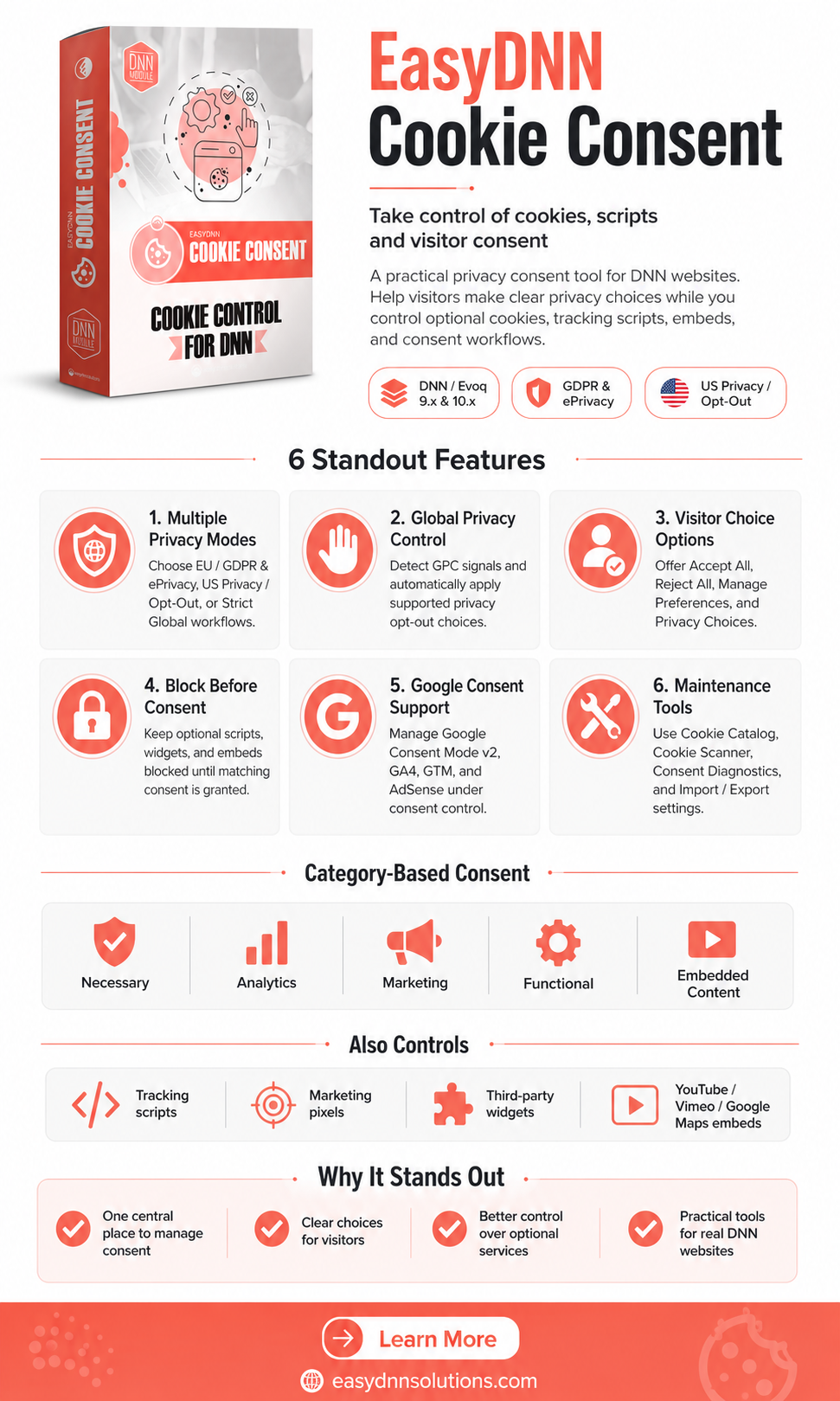
With version 2.0, the module has grown far beyond a basic cookie banner. EasyDNN Cookie Consent is now a more complete privacy consent tool for DNN websites, designed to help website owners manage modern consent requirements, Google consent signals, embedded content, privacy choices, cookie documentation, diagnostics, and integrations with other DNN and EasyDNN modules.
Modern websites are no longer simple pages with a few cookies. They often include analytics tools, advertising platforms, Google Tag Manager, Google AdSense, embedded YouTube and Vimeo videos, Google Maps, chat widgets, tracking pixels, verification tools, and many other third-party resources.
Because of that, website owners need more than a simple cookie notice. They need a real consent workflow that controls what is loaded, when it is loaded, how visitor choices are stored, and how those choices are communicated to other tools and services.
EasyDNN Cookie Consent 2.0 was built for exactly that.
From Cookie Banner to Privacy Consent Workflow
EasyDNN Cookie Consent 1.0 introduced the foundation: a visitor-friendly cookie banner, a preference modal, cookie categories, basic script blocking, a script manager, consent logs, and tools for managing known cookies.
Version 2.0 expands this into a much broader consent workflow.
With EasyDNN Cookie Consent 2.0, DNN website administrators can now:
- Choose between EU, US, and Strict Global privacy modes
- Support Global Privacy Control signals
- Add US Privacy Choices and “Do Not Sell or Share” workflows
- Use a more advanced Google Consent Mode v2 setup
- Manage GA4, GTM, and AdSense consent behavior
- Automatically block YouTube, Vimeo, and Google Maps embeds before consent
- Document website cookies with a Cookie Catalog
- Scan pages for cookies, trackers, embeds, pixels, and third-party resources
- Use Consent Diagnostics to check whether the consent setup works correctly
- Import and export consent configuration between portals or environments
- Allow other DNN and EasyDNN modules to check consent before creating optional cookies
In short, EasyDNN Cookie Consent 2.0 gives DNN website owners more control, more transparency, and a more complete workflow for managing visitor privacy choices.
EU, US, and Strict Global Privacy Modes
One of the most important changes in version 2.0 is the introduction of privacy modes.
Different websites have different privacy requirements depending on their audience, legal context, business model, and internal privacy policy. EasyDNN Cookie Consent 2.0 now allows administrators to choose the consent model that best fits their website.
The module supports three main privacy modes:
- EU / GDPR & ePrivacy mode
- US Privacy / Opt-Out mode
- Strict Global mode
EU mode is designed for websites that need a GDPR and ePrivacy-style consent approach. Optional cookies, analytics, marketing scripts, and embedded content can remain blocked until the visitor gives consent.
US mode supports a different privacy model, focused on opt-out choices such as “Do Not Sell or Share My Personal Information” and targeted advertising preferences.
Strict Global mode is useful for websites that want to apply a stricter EU-style consent approach to all visitors, regardless of their location. This can be a practical option for website owners who prefer a simpler global setup without relying on GeoIP-based behavior.
Global Privacy Control Support
EasyDNN Cookie Consent 2.0 adds support for Global Privacy Control, also known as GPC.
GPC is a privacy signal that can be sent by a browser or browser extension to indicate that the visitor does not want their personal information to be sold or shared, and does not want to be tracked for certain advertising purposes.
When GPC is active in US Privacy mode or Strict Global mode, EasyDNN Cookie Consent can automatically apply the appropriate privacy choices.
For example, the module can automatically:
- Reject Marketing consent
- Apply “sale/share” opt-out
- Apply targeted advertising opt-out
Respect the visitor’s privacy signal without requiring an additional click
This makes the consent workflow more privacy-aware and helps website owners respond to browser-level privacy preferences in a more structured way.
US Privacy Choices and “Do Not Sell or Share” Workflow
Version 2.0 also adds a dedicated Privacy Choices tab for US privacy needs.
This allows visitors to manage opt-out choices such as:
- Do Not Sell or Share My Personal Information
- Targeted Advertising opt-out
For websites that need this type of workflow, EasyDNN Cookie Consent 2.0 makes it easier to provide a clear privacy choice interface directly inside the consent modal.
Site owners can also add a dedicated “Do Not Sell or Share” link to the website footer, DNN HTML module, skin, template, or any other appropriate place on the website.
This allows visitors to reopen privacy choices later and update their preferences when needed.
More Advanced Google Consent Mode v2 Support
Google Consent Mode v2 has become an important part of modern consent management for websites that use Google services.
EasyDNN Cookie Consent 2.0 includes a more advanced Google Consent Mode v2 implementation and supports both basic and advanced approaches.
In basic mode, Google tags can remain blocked until the visitor gives the required consent.
In advanced mode, Google tags can be allowed to load after a denied default state is sent, and consent signals can then be updated when the visitor makes a choice.
The module supports the main Google consent types, including:
- analytics_storage
- ad_storage
- ad_user_data
- ad_personalization
- functionality_storage
- personalization_storage
- security_storage
This gives website administrators more flexibility when configuring Google services and helps ensure that visitor consent choices are communicated more clearly to Google tools.
GA4, GTM, and AdSense Consent Control
EasyDNN Cookie Consent 2.0 can help manage common Google services through consent categories.
For websites using Google Analytics 4, GA4 can be loaded only after the visitor gives Analytics consent.
For websites using Google Tag Manager, GTM can be connected to the appropriate consent category, often Marketing or Analytics, depending on how tags are configured.
For websites using Google AdSense, AdSense can be treated as Marketing and remain blocked until the visitor gives the required consent.
This is especially useful for DNN websites that use analytics, advertising, remarketing, or monetization tools and want better control over when those tools become active.
Automatic Blocking of YouTube, Vimeo, and Google Maps Embeds
One of the most useful improvements in EasyDNN Cookie Consent 2.0 is automatic embedded content blocking.
Many existing DNN websites already contain YouTube videos, Vimeo videos, or Google Maps embeds across many pages, articles, modules, and templates. Manually replacing each embed with consent-aware code can be time-consuming.
EasyDNN Cookie Consent 2.0 can automatically detect existing:
- YouTube iframes
- Vimeo iframes
- Google Maps iframes
Before they load, the module can replace them with a consent placeholder. The embedded content is then loaded only after the visitor gives the required consent.
This means website owners do not need to manually edit every existing YouTube, Vimeo, or Google Maps embed on the website.
For websites with many old articles, landing pages, map embeds, or video content, this can save a significant amount of time.
Cookie Catalog
EasyDNN Cookie Consent 2.0 introduces a new Cookie Catalog.
The Cookie Catalog allows administrators to document cookies used by the website in a structured way.
For each cookie, administrators can define information such as:
- Cookie name
- Provider
- Purpose
- Duration
- Category
- Type
- Provider policy link
The Cookie Catalog can be shown to visitors inside the About Cookies tab of the preference modal.
This improves transparency and gives visitors a clearer explanation of which cookies may be used and why.
For website administrators, the Cookie Catalog provides a central place to document cookies instead of keeping this information scattered across separate pages, documents, or privacy policy text.
Cookie Scanner and Tracker Analysis
EasyDNN Cookie Consent 2.0 includes an improved scanning workflow that helps administrators discover cookies and tracking-related resources on the current page.
The scanner can help identify:
- Cookies
- Tracking scripts
- Pixels
- Iframes
- Map embeds
- Video embeds
- Chat widgets
- Verification widgets
- Other potential tracking resources
The scanner does not automatically change the website configuration. Instead, it gives administrators useful information and suggestions that can be reviewed and saved manually.
This is important because automated changes can be risky on complex websites. EasyDNN Cookie Consent gives administrators more visibility, but keeps them in control.
Consent Diagnostics
Setting up consent correctly can be challenging, especially on existing websites that already have many scripts, embeds, templates, and third-party tools.
That is why EasyDNN Cookie Consent 2.0 adds Consent Diagnostics.
Consent Diagnostics helps administrators check whether the consent setup is working as expected.
It can warn about potential issues such as:
- Tracking scripts loading too early
- Iframes appearing before embedded content consent
- Public consent API not being available
- Do Not Sell or Privacy Choices functions not being available in US or Strict Global mode
This makes it easier to find configuration problems and improve the consent setup before they become a real issue.
For agencies and developers maintaining DNN websites, Consent Diagnostics can also be useful during setup, testing, staging, and troubleshooting.
Import and Export Configuration
EasyDNN Cookie Consent 2.0 adds Import and Export options for consent configuration.
This is especially useful for:
- Agencies managing multiple DNN websites
- Staging-to-production workflows
- Multi-portal DNN installations
- Reusing a tested consent setup across similar websites
- Backing up configuration before larger changes
The export can include:
- Settings
- Categories
- Cookie Catalog
- Cookie Rules
- Managed Scripts
Visitor consent logs and visitor history are not included in the export.
This makes configuration transfer easier while keeping visitor-specific data separate.
Developer Integration for DNN and EasyDNN Modules
A proper consent workflow is not only about deleting cookies after a visitor rejects them.
In many cases, the better approach is to prevent optional cookies and tracking logic from running before consent is given.
EasyDNN Cookie Consent 2.0 introduces server-side integration through ConsentContextService. This allows other DNN modules and EasyDNN modules to check the current consent state before setting optional cookies or running optional tracking behavior.
This is an important step toward a more complete DNN consent ecosystem.
Instead of each module working in isolation, other modules can now respect the visitor’s consent choices more consistently.
For developers, this opens the door to cleaner integrations and better privacy-aware module behavior.
Better Control for DNN Website Owners
EasyDNN Cookie Consent 2.0 was developed for real DNN websites.
Many DNN websites have been online for years. They often contain older pages, many modules, embedded videos, Google Maps, analytics scripts, advertising code, and third-party integrations added over time.
Managing privacy consent on this type of website can be difficult if everything has to be changed manually.
EasyDNN Cookie Consent 2.0 helps by giving administrators one central place to manage consent behavior, categories, scripts, embedded content, privacy choices, cookie documentation, diagnostics, and configuration.
The goal is simple: give DNN website owners more control over privacy consent without making the setup unnecessarily complicated.
Ready for a More Complete Consent Setup on Your DNN Website?
EasyDNN Cookie Consent 2.0 is a major step forward from version 1.0.
It keeps the practical cookie banner and preference management workflow, but adds a much broader set of tools for modern privacy consent management.
With version 2.0, DNN website owners can:
- Give visitors clearer privacy choices
- Control analytics, marketing, advertising, and embedded content before it loads
- Support EU, US, and Strict Global privacy modes
- Respect Global Privacy Control signals
- Manage Google Consent Mode v2 more precisely
- Document cookies in a Cookie Catalog
- Scan pages for cookies and trackers
- Diagnose consent setup issues
- Reuse configuration across portals and environments
- Allow other DNN and EasyDNN modules to respect consent choices
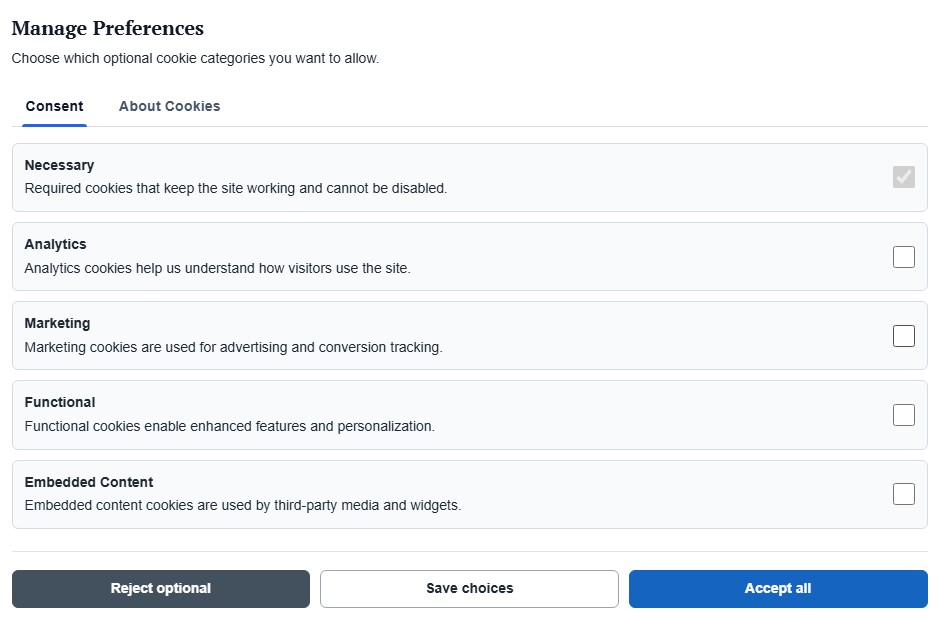
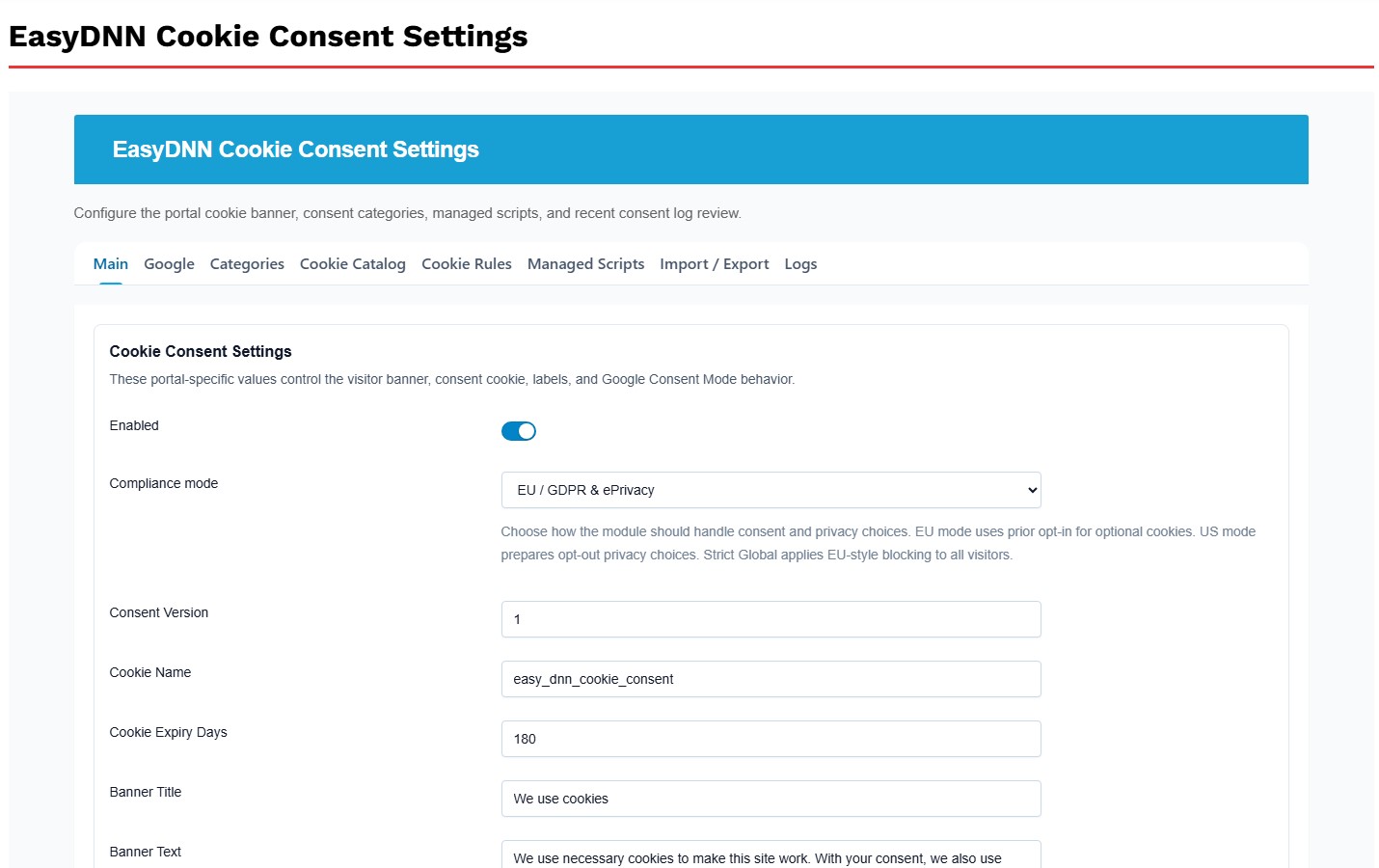
EasyDNN Cookie Consent 2.0 helps DNN websites move from a simple cookie notice to a more complete privacy consent workflow.
For website owners, this means better control.
For administrators, it means easier setup and maintenance.
For visitors, it means clearer choices and more transparency.
How to get EasyDNN Cookie Consent?
Cokie Consent can now be purchased on the DNN Store as a standalone module. You can also download a trial version from our website. BlockBuilder is also included in our complete DNN theme and module collection — EasyDNN Theme & Module Collection.